
Seu navegador está em português, e este guia está disponível em português.
お使いのブラウザは日本語に設定されています。このガイドは日本語でも読めます。
Cropping
Cropping cuts the empty margin off a page before the page is fitted to the screen, so the drawing comes out larger. The settings are in the Cropping section of Advanced conversion options. Page cropping is dimmed, with the reason, for Webtoon strips and for Use the images as they are, and the three numbers (power, minimum, margin) follow it: they are also dimmed while it is Disabled. Inter-panel cropping is dimmed only for Use the images as they are.
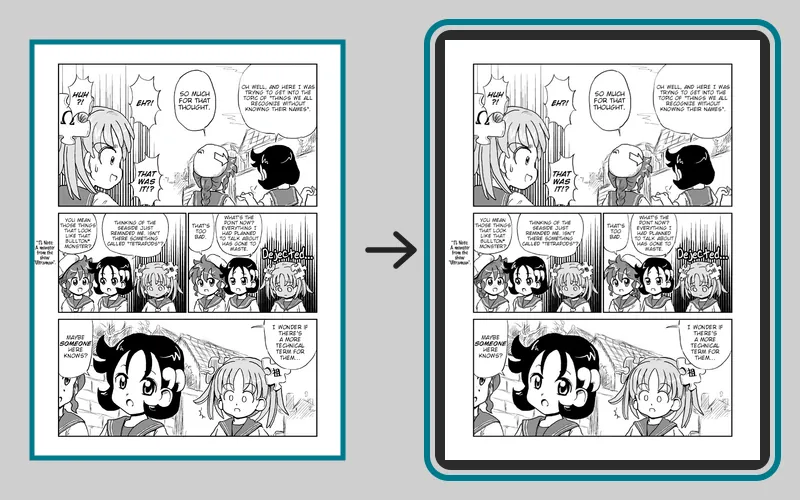
In the pictures of the next two sections, the page that was converted is on the left, with the part that is kept outlined in teal and the part that is cut away shaded pink; on the right is the page as it comes out, on a screen.
Page cropping
Section titled “Page cropping”The default is Margins and page numbers.
--cropping disabled1272 × 1696 px, 378 KB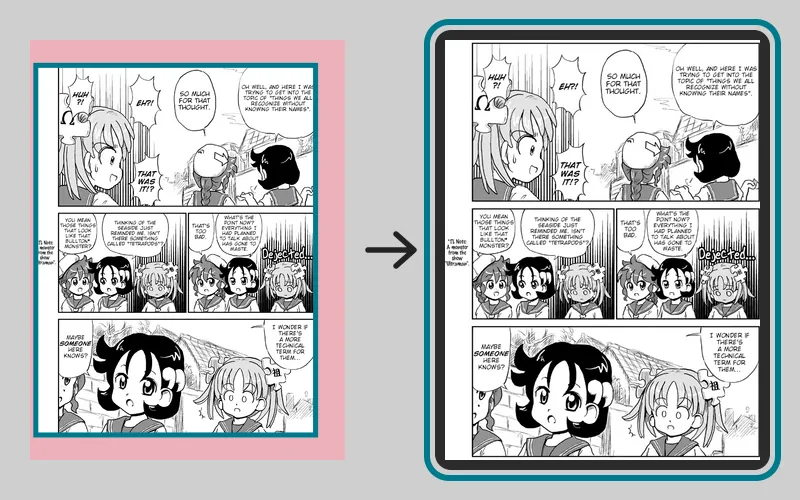
--cropping margins-and-page-numbers1272 × 1696 px, 428 KBArt:Go Go! Encyclopedia Girls, page 2 by Kasuga, English version by Masatami (CC BY-SA 4.0). Converted with mangaprep 0.9.0.

The page is the same shape as the screen, so with cropping Disabled the margin stays and the drawing is smaller. With cropping on, the margin goes and the drawing grows to take its place.
- Disabled: the page goes to the screen as it is.
- Margins: mangaprep looks for where the drawing is. It turns the page gray (and inverts it when the background is dark), stretches its tones, blurs it slightly, and counts as paper everything lighter than a threshold. The box around what is left is the drawing, and the page is cut to it. No page is cut by more than 10% of its width or height on each side, so a scan with a very wide border keeps what is beyond that.
- Margins and page numbers: the same, then one more look at a thin strip just above the bottom edge of the box. If it holds exactly one small dark shape, about the size of a number of one to three digits, the page is cut from just above it. Two or more shapes, or one that is too large, are taken for drawing and left alone.
The page above has no page number, so Margins gives the same result as Margins and page numbers. --cropping takes disabled, margins or margins-and-page-numbers; -c is its short form.
Cropping power
Section titled “Cropping power”The default is 1, and the app accepts 0 to 10. The power sets the threshold the page is judged by: 240 − 64 × power, on a scale where 255 is white. At 1 the threshold is 176, so every tone lighter than that is paper. A higher power lowers the threshold, and darker and darker tones count as paper too, so the crop reaches into shading and thin lines.
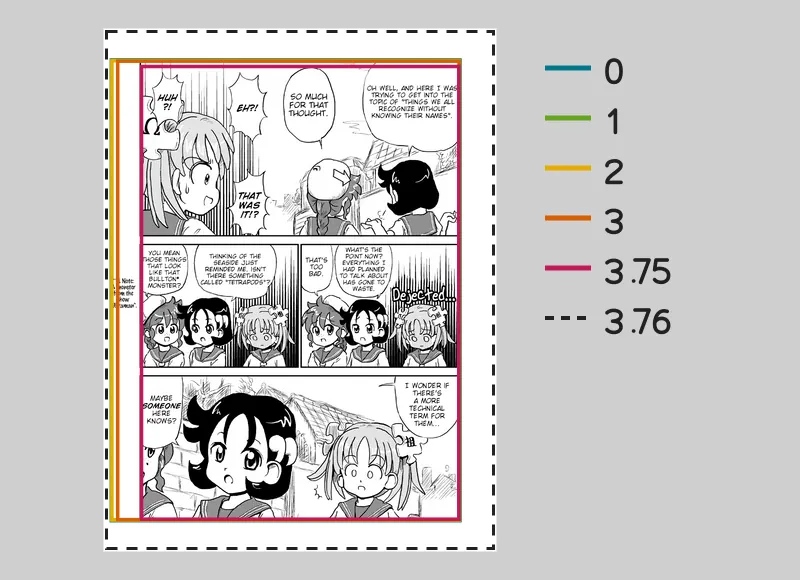
The picture outlines the part of one page that is kept at each power, with the power beside the color of its outline. The outlines for 0, 1, 2 and 3 are almost one; 3.75 is the tightest; and at 3.76 nothing is cropped, so its dashed outline is the whole page.
--croppingpowerArt:Go Go! Encyclopedia Girls, page 2 by Kasuga, English version by Masatami (CC BY-SA 4.0). Converted with mangaprep 0.9.0.
| Setting | On the command line | Page size | Of the page kept |
|---|---|---|---|
| Cropping power: 0 | --croppingpower 0 | 975 × 1284 | 80.5% |
| Cropping power: 1 | --croppingpower 1 | 973 × 1281 | 80.1% |
| Cropping power: 2 | --croppingpower 2 | 970 × 1280 | 79.8% |
| Cropping power: 3 | --croppingpower 3 | 954 × 1278 | 78.4% |
| Cropping power: 3.5 | --croppingpower 3.5 | 946 × 1277 | 77.7% |
| Cropping power: 3.75 | --croppingpower 3.75 | 887 × 1262 | 72% |
| Cropping power: 3.76 | --croppingpower 3.76 | 1080 × 1440 | 100% |
Art:Go Go! Encyclopedia Girls, page 2 by Kasuga, English version by Masatami (CC BY-SA 4.0). Converted with mangaprep 0.9.0.
Higher is not always more. At 3.75 the threshold is 0: only pure black still counts as drawing, so the crop hugs the blackest lines and cuts into the page, down to 887 pixels wide here. A power of 3.76 or more puts the threshold below zero. Nothing counts as drawing, mangaprep finds none, and the page is left uncropped. A power above 3.75 therefore turns cropping off instead of strengthening it. If a scan has gray margins, try 2 before going higher.
--croppingpower sets it.
Minimum retained area
Section titled “Minimum retained area”The default is 0%, and the app accepts 0 to 100%. mangaprep crops only when the cropped page keeps at least this share of the page’s area, and leaves the page as it is otherwise.
| Setting | On the command line | Page size | Of the page kept |
|---|---|---|---|
| Minimum retained area: 0% | --croppingminimum 0 | 973 × 1281 | 80.1% |
| Minimum retained area: 70% | --croppingminimum 70 | 973 × 1281 | 80.1% |
| Minimum retained area: 80% | --croppingminimum 80 | 973 × 1281 | 80.1% |
| Minimum retained area: 81% | --croppingminimum 81 | 1080 × 1440 | 100% |
| Minimum retained area: 90% | --croppingminimum 90 | 1080 × 1440 | 100% |
Art:Go Go! Encyclopedia Girls, page 2 by Kasuga, English version by Masatami (CC BY-SA 4.0). Converted with mangaprep 0.9.0.
The crop of this page keeps 80.1%, so a minimum of 80 allows it and 81 refuses it. Use it to protect pages that are mostly empty, where the detected drawing is a small part of the page and cutting to it would blow up a few lines to fill the screen: with a minimum of 70, a crop that would leave less than 70% of the page is not made. --croppingminimum sets it.
Preserved margin
Section titled “Preserved margin”The default is 0%, and the app accepts 0 to 100%. The crop is backed off by this percentage after the 10% limit, so some margin stays: at 50% half of what would have been removed is kept, at 100% nothing is removed. In the second picture the dashed outline is where the cut was at 0%.
--preservemargin 01272 × 1696 px, 428 KB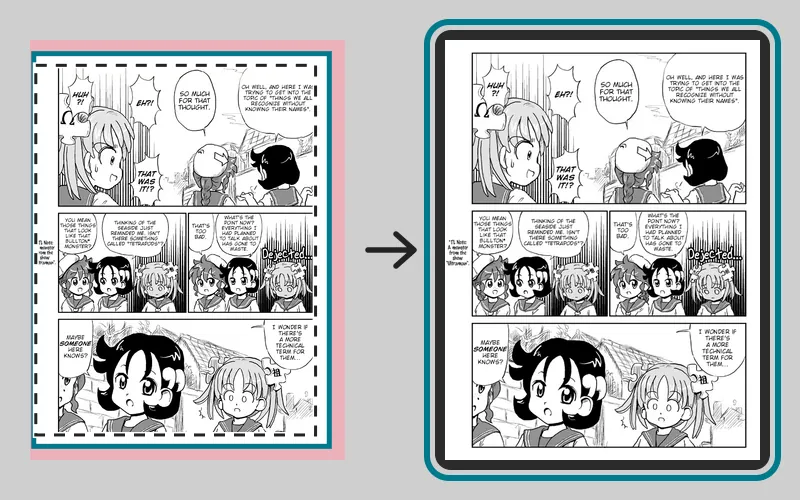
--preservemargin 501272 × 1696 px, 404 KBArt:Go Go! Encyclopedia Girls, page 2 by Kasuga, English version by Masatami (CC BY-SA 4.0). Converted with mangaprep 0.9.0.
| Setting | On the command line | Page size | Of the page kept |
|---|---|---|---|
| Preserved margin: 0% | --preservemargin 0 | 973 × 1281 | 80.1% |
| Preserved margin: 25% | --preservemargin 25 | 1000 × 1321 | 84.9% |
| Preserved margin: 50% | --preservemargin 50 | 1027 × 1360 | 89.8% |
| Preserved margin: 100% | --preservemargin 100 | 1080 × 1440 | 100% |
Art:Go Go! Encyclopedia Girls, page 2 by Kasuga, English version by Masatami (CC BY-SA 4.0). Converted with mangaprep 0.9.0.
--preservemargin sets it.
Inter-panel cropping
Section titled “Inter-panel cropping”The default is Disabled. This option removes the empty gutters between panels, not the margin around the page. Horizontal gaps removes the rows that are paper from edge to edge; Horizontal and vertical gaps removes the columns too. A gutter within 1% of the page’s border is not removed, and a thin strip of every gap stays so that panels do not touch. Cropping power does not apply to it: its threshold is fixed.
It is meant for webtoon-style pages that have long empty stretches. The example joins three pages of Pepper&Carrot into one tall strip, as Reading does, converts it as Webtoon strips, and shows the second page of the result. In each picture the page is on the left, with the rows and columns that were removed shaded pink, and on the right is the page that is left, at the same scale.
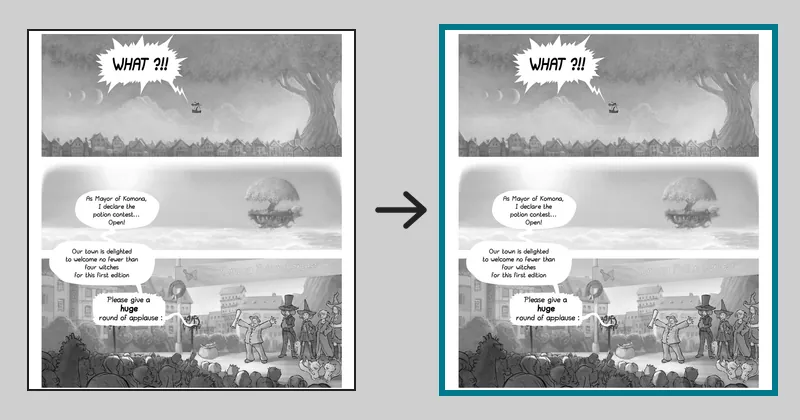
--webtoon992 × 1092 px, 180 KB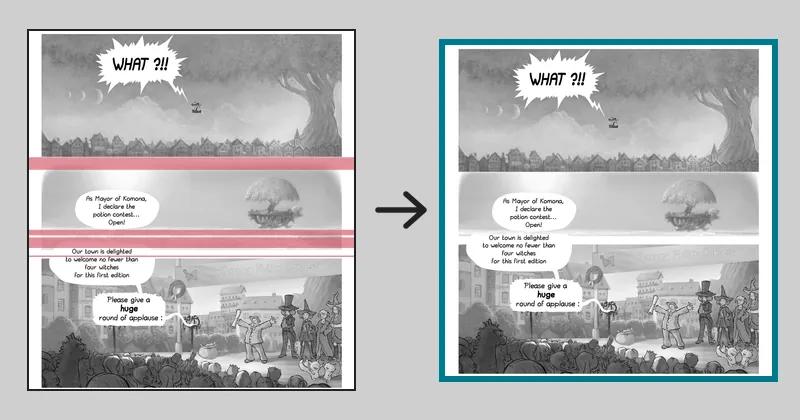
--webtoon --ipc horizontal992 × 1004 px, 173 KB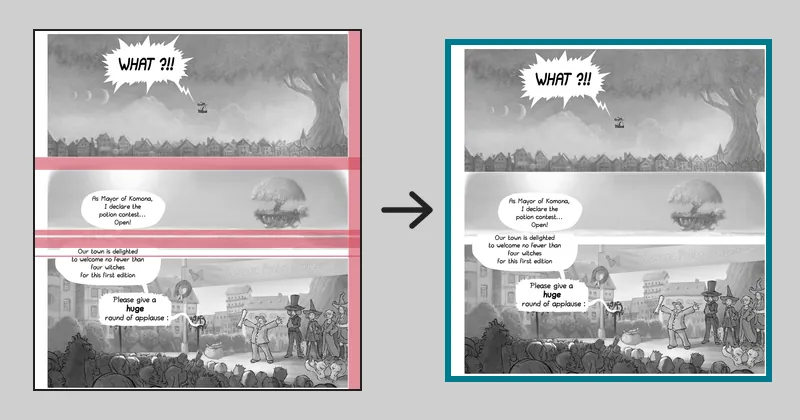
--webtoon --ipc both956 × 1004 px, 173 KBArt:Pepper&Carrot, episode 6 by David Revoy (CC BY 4.0). Converted with mangaprep 0.9.0.
In the last picture the strip along the right edge goes too, and that is not a gutter between panels. For columns, the 1% of the border is measured against the page’s height, not its width, which is how KCC does it and mangaprep follows it. On a page taller than it is wide, a white strip along the right edge is therefore removed as if it were a gutter, while the one along the left edge stays.
--ipc takes disabled, horizontal or both.